Settings
This page covers the settings of the desktop app that you are most likely to change. Open Settings in the sidebar of the app. Changes apply when you choose Save settings, except the theme, which switches at once.
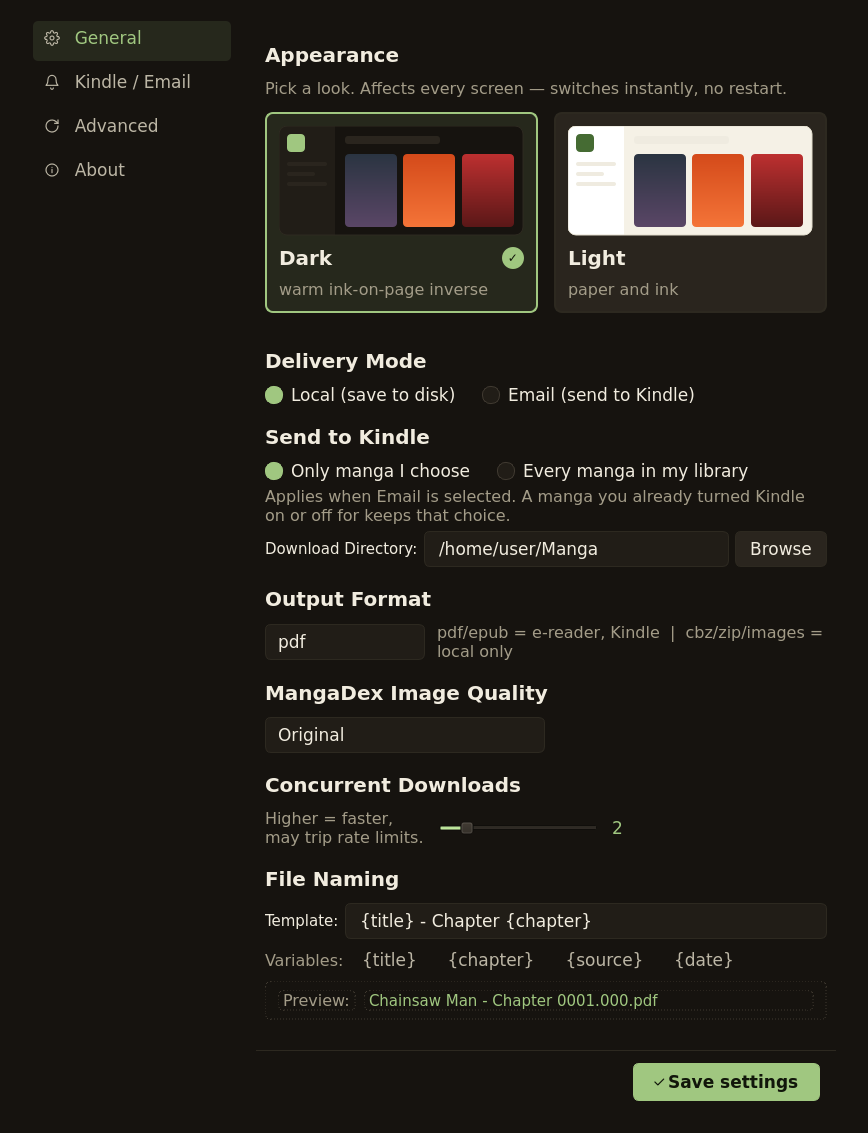
The General settings in the development version. The download folder is a sample value, not the default. File names explains the {date} chip.
Theme
Settings → General → Appearance offers a dark and a light theme.
Download folder and output format
Settings → General sets where chapters are saved and in which format. Each series gets its own subfolder.
PDF and EPUB suit e-readers and can be sent to a Kindle. CBZ, ZIP and image folders are kept on your computer only.
Concurrent downloads
Concurrent Downloads sets how many chapters download at the same time, from 1 to 8. A higher number is faster but makes it more likely that a source limits you.
File names
File Naming takes a template for the file name of each chapter. The default is {title} - Chapter {chapter}. Saved file names can use {title}, {chapter} and {source}, and a preview under the field shows the name they produce.
The field also offers a {date} chip, and the preview fills in the date, but the saved file name keeps the literal text {date}. Leave it out of your template.
Storage and cover cache
Covers are stored on disk so the Library opens quickly. Settings → Advanced → Clear cache removes them; they are downloaded again when needed. Open logs folder opens the folder with MeManga's log files; Troubleshooting says what is in them.
Back up and restore your library
Settings → Advanced → Import / Export saves your library to a JSON file and reads it back: each series with the chapters downloaded and read and where you stopped reading. Your settings and the app's history are not in the file.
| Button | What it does |
|---|---|
| Export | Writes your series and their state to a file. |
| Import (Merge) | Adds what is in the file to your current library. |
| Import (Replace) | Replaces your current library with the file. |
The command line reads and writes the same file with memanga export and memanga import. Export and import describes the file and how a merge combines it with your library.
Kindle delivery
Sending chapters to a Kindle is set up under Settings → Kindle / Email. Send chapters to a Kindle explains it step by step.
Run a command after each download
Settings → Advanced → Post-Processing runs a command of your own after each chapter is saved. Run a command after each download explains it with an example.
Network and privacy
Settings → Advanced → Network & Privacy turns the connection check, the MangaDex cover search and the chapter counts in search on or off. Network connections lists every connection the app makes and what each setting changes.
Reader and partial chapters
Two groups of settings are described where they are used:
- Prefetch and remove after reading, on the reader page.
- Partial chapters, on the library page.
Cover cache limit and version details
- The cover cache has a size limit that you can change.
- Settings → About can copy version details for a bug report.